Bluehost AI Builder Review: I Built a Booking App in One Prompt (and When WordPress Is Better)

Bluehost AI Builder pitches a shortcut for small business owners who don’t want to learn a site editor: describe the site you need in plain English, and get a working website back in minutes. Not just pages, either. It also builds web apps such as booking systems, quote forms and client portals, with an admin panel behind them.
I wanted to know if that holds up, so I tested it on a real project, building it twice in November 2026. I asked it for a website and client portal for a small WordPress repair agency, then filled in its forms as a visitor and managed the requests as the business owner. This review covers what it built, what went wrong, what it costs, and when you should still pick WordPress instead.
Quick verdict
- Best for: small businesses that need a simple site plus a booking, quote or client portal tool, without plugins or code.
- Not for: online stores, sites that need payments today, or anyone who wants full control and the WordPress plugin ecosystem.
- Price: $0 to start, no credit card. Paid plans from $20/mo when you want your own domain.
- My result: one prompt and two quick questions produced a working site, quote form, booking calendar and admin panel in about five minutes. One display bug needed a chat fix.
Prefer to watch? Here is the full test on video, from the prompt to the admin panel.
What Is Bluehost AI Builder?
Bluehost AI Builder is a prompt-based builder that Bluehost launched in November 2026. You describe your business in one or two sentences, answer a few guided questions, and it builds the site and hosts it for you. You keep improving it by chatting: ask for a change, and the AI edits the site.
What makes it different from most AI website builders is the app side. It works as an AI web app builder too: Bluehost says it can build booking systems, quote request forms, customer portals, directories and internal tools. Every app comes with saved submissions, user accounts with roles and an admin panel, and it can send email alerts once you connect an email service.
Is Bluehost AI Builder WordPress?
No. This is the most important thing to understand before you start. Bluehost AI Builder does not create a WordPress site, and you can’t export your project to WordPress. Bluehost’s help center says there is no source code access, no FTP and no code export. There are no themes or plugins to install, and you don’t get a WordPress dashboard.
Bluehost’s AI tools have similar names, so check which one you are signing up for. Bluehost AI Builder makes standalone sites and apps. WordPress AI Builder is the Bluehost AI website builder for WordPress: it generates a starting design inside a regular WordPress site on a hosting plan. AI Store builds an online shop on WordPress and WooCommerce. If you already know you want WordPress, my guide on how to use WordPress is a better starting point than any AI builder.
How I Tested It
I used the free plan and built the same project twice, on 10 and 17 November 2026: a site for a fictional business, Maple Lane WordPress Care, a small agency that fixes and maintains WordPress sites. I only used sample data with test email addresses, and I kept the project unpublished, so everything here was tested in the editor’s preview and not on a live address. I tested the visitor and owner sides, but I didn’t sign in as a client. Every screenshot below comes from the first build.
How to Build a Site With Bluehost AI Builder
Step 1: Describe your site or app
The prompt box sits right on the Bluehost AI Builder page. You can also attach your logo, photos or a site you like as a design reference. I typed this:
A website and client portal for Maple Lane WordPress Care, a small agency that fixes and maintains WordPress sites. Visitors can read our services and monthly care plans, request a quote for a fix, and book a free 20-minute consultation call. Clients log in to see the status of their requests, and our team manages requests and bookings from an admin panel.
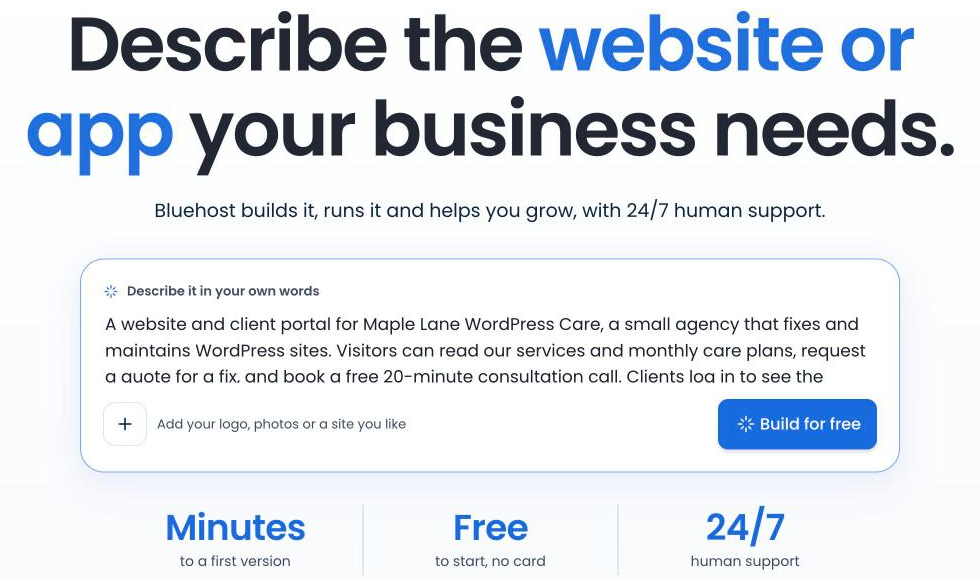
Clicking Build for free opens a sign-up screen. You can continue with Google, Apple or GitHub, or use an email and password. A phone number is optional, and the free plan doesn’t ask for a card.
Step 2: Answer the guided questions
Before building, the AI asked me two questions, each with a recommended answer: how clients get a portal login, and how people sign up for a care plan. I picked “They sign up themselves” and “They request it, you follow up.” In my second build a week later, it skipped the questions and went straight to building.
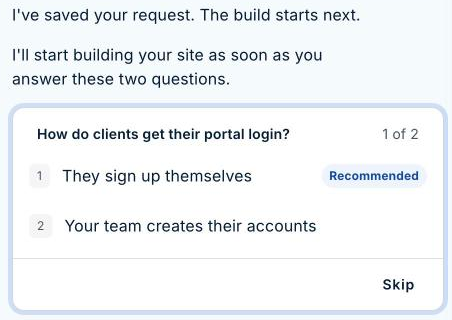
These questions did not use any credits. One thing to watch: the second question offered “They pay online by card,” but Bluehost’s own help center says Bluehost AI Builder doesn’t support online payments yet. Choose the follow-up option unless Bluehost confirms payments are available for your plan.
Step 3: Let it build
The build runs through a visible checklist: setting up the look, adding plans, quotes and bookings, building the dashboard, building the pages and portal, and testing the pages. It also shows an optional four-question survey about you while it works. You can skip it.
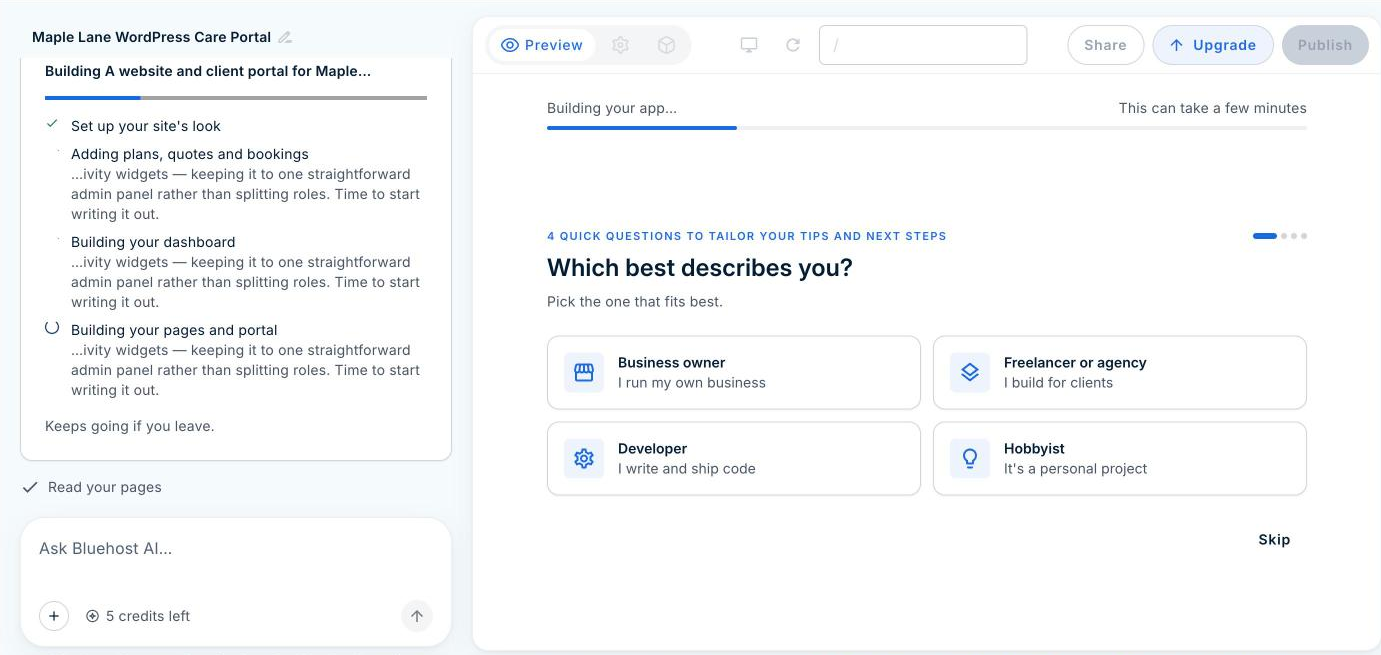
When it finished, the AI summarized what it built: services and plans pages, a quote form, free call booking, a client portal and a team dashboard. It also reminded me that the address, phone number and hours were placeholders to change under Business details.
Step 4: Review what it made
The result looked like a real small business site, although every price, plan feature and contact detail was sample content the AI made up. The homepage had a clear headline, a list of repairs with starting prices, three monthly care plans, a strip of available call times and a four-step “How it works” section.
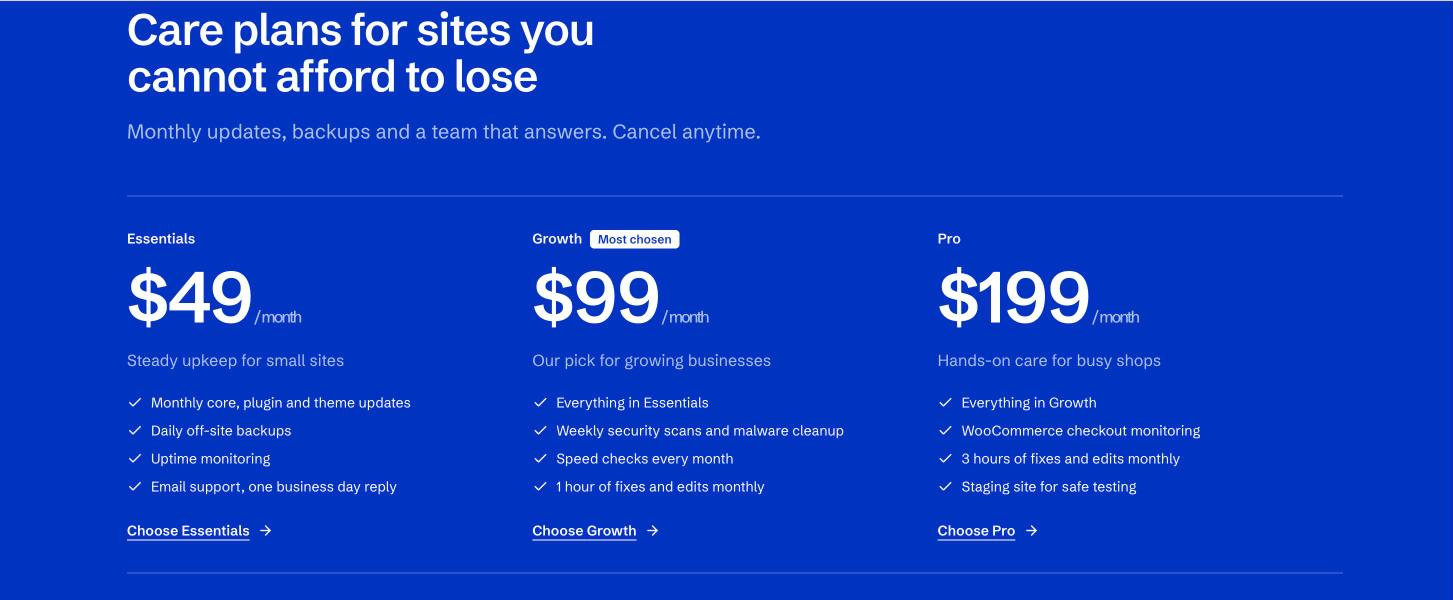
It wasn’t perfect. The sample ticket card in the homepage hero was meant to show a request moving from Received to Done, but its text was white on a white card, so it looked like an empty box.

Step 5: Edit it by chatting
To fix the card, I described the problem in the chat: the card looks empty because its text is white on a white card, so make the text dark. About 90 seconds later, the AI explained what it changed and the card was readable. That edit used one credit. There is no undo button, so check each change before you ask for the next one.

Be specific when you ask for changes. Name the section, say what is wrong and say what you want instead. Vague requests such as “make it look better” are more likely to change things you wanted to keep.
Step 6: Test the forms and bookings
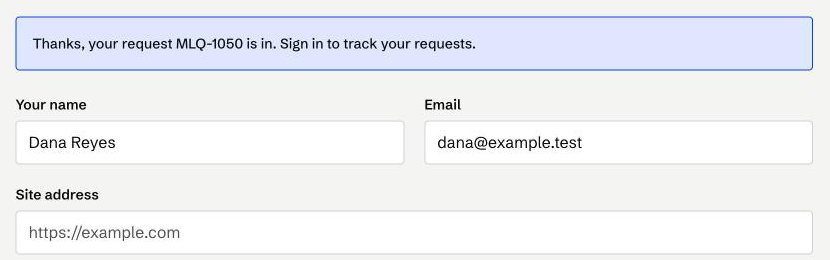
I sent a quote request as a visitor, asking for help with a white screen after a plugin update. The form gave me a ticket number straight away.
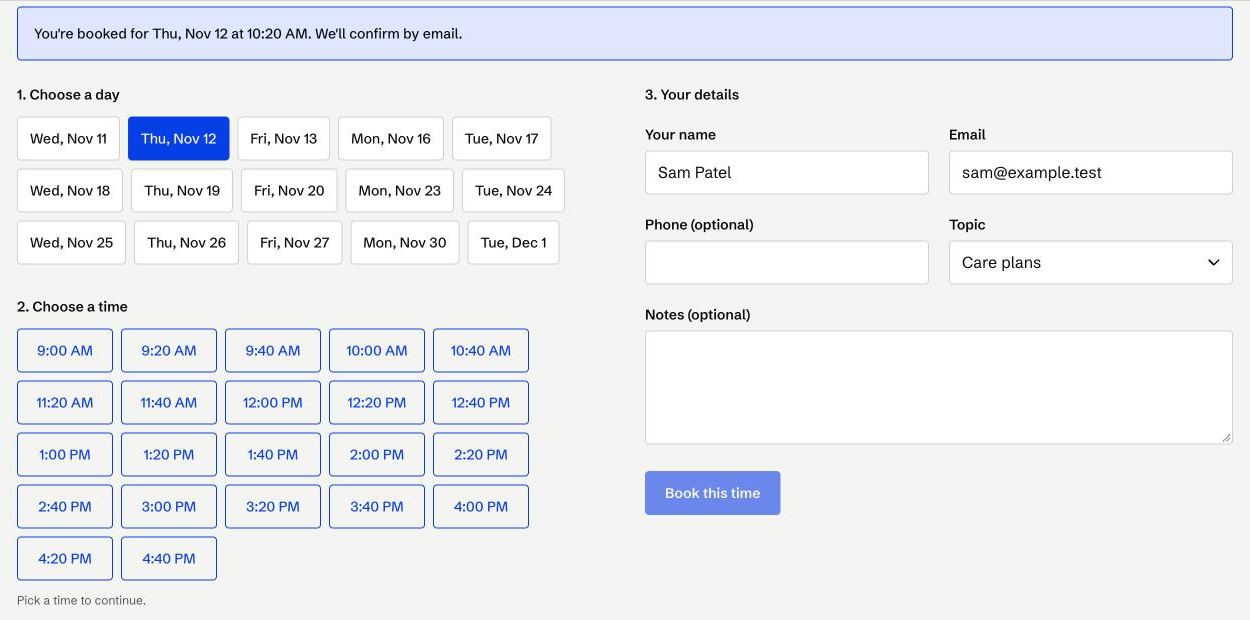
Then I booked a free 20-minute call. The booking page shows the next three weeks of weekdays and 20-minute slots. After I booked Thursday at 10:20 AM, that time disappeared from the list, so two people can’t book the same slot.
Step 7: Manage requests in the admin panel
The Manage tab in the editor opens the app’s back office. Mine had a dashboard, users, messages, business details, quote requests, plan requests, bookings, services and plans. My test request was waiting in the list with its site address and urgency.
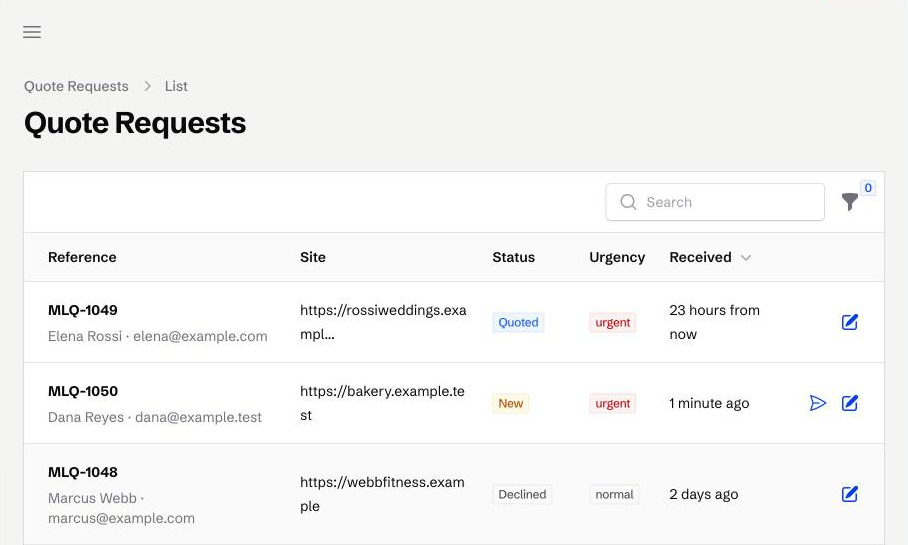
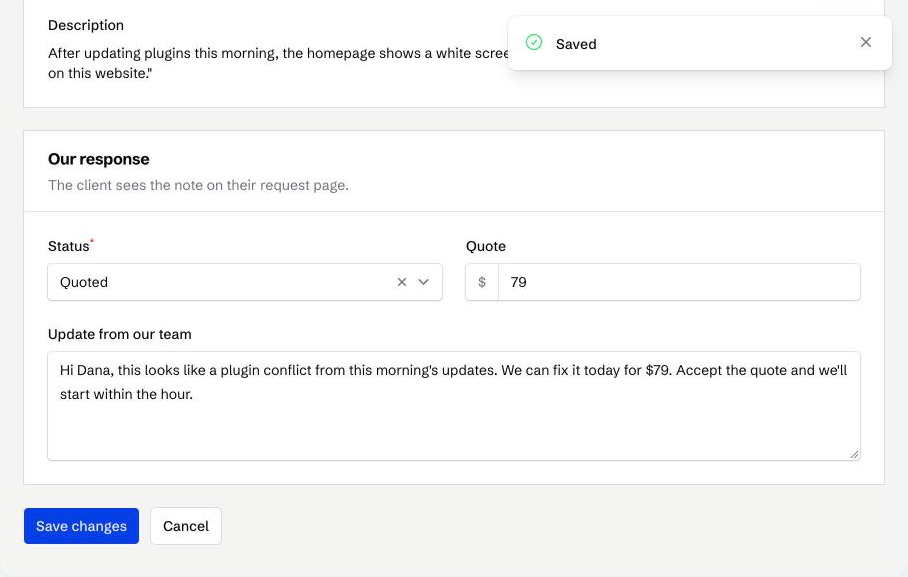
Opening a request lets you set its status (New, Quoted, Accepted, In progress, Completed or Declined), enter a price and write an update the client sees on their request page. I quoted $79 and saved it. In the bookings list, each call has Confirm, Cancel and Complete buttons. Editing records here doesn’t use credits. Only chat requests do.
Step 8: Publish and connect a domain
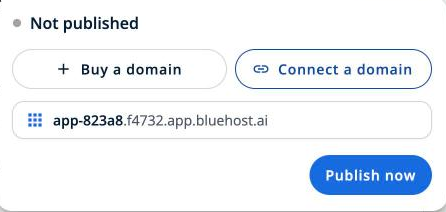
The Publish button shows a free address ending in .app.bluehost.ai, plus options to buy or connect your own domain. The free address is created for you and can’t be changed, and connecting a domain needs a paid plan. I kept my test project unpublished.
Things to Fix Before You Go Live
- Delete the sample data. My build came with sample quotes, bookings and client accounts. Bluehost notes that preview and live versions share the same database, which means anything you add or delete while testing also changes what real visitors and clients see. One sample request was even dated “23 hours from now.”
- Connect an email service. Confirmation emails don’t send until you set up Resend or Postmark, two email delivery services. You need a domain you own, a few DNS records to verify it, and then an API key (a password-like code) pasted into your app’s settings. Bluehost adds that new Postmark accounts start in test mode. My booking page said “We’ll confirm by email,” but no email would have gone out.
- Set an admin password. The Manage tab works without one inside the editor, but the live admin page has its own sign-in screen.
- Replace the placeholder business details, and add a privacy policy if you collect any personal information.
- Test everything yourself. Bluehost’s help center warns that AI-generated code can contain errors, and my contrast bug proves it.
- Ask for spam protection. Bluehost says form validation and spam protection are only added when you ask for them, so request both in the chat before you share a form.
- Expect a slow first visit. According to Bluehost’s help center, a published app goes to sleep after 15 minutes without visitors, and the next visit loads slower than usual.
Bluehost AI Builder Pricing
Bluehost AI Builder is $0 to start, no credit card. Paid plans from $20/mo. Credits are what you spend: building and each change request use one credit, while the AI’s questions are free. Hosting never uses credits, and if you run out, your published site stays online.
| Plan | Price | Credits | Key extras |
|---|---|---|---|
| Free | $0 to start, no credit card | 5 a day, up to 30 every 30 days | Unlimited sites and apps, forms, bookings, user accounts, admin panel, free .app.bluehost.ai address |
| Lite | $20/mo | 100 a month, no daily limit | Custom domain, no Bluehost badge |
| Standard | $40/mo | 200 a month | Everything in Lite |
Five daily credits were plenty for my test: one for the first build and one for a fix. If you plan to make many small edits in one sitting, the daily cap on the free plan is the limit you will notice first. The daily credits reset at 00:00 UTC, and Bluehost’s help center says you can buy extra credits as a top-up on any plan, including Free.
What It Can’t Do (Yet)
- No online payments or product sales. Bluehost points sellers to its separate AI Store, which is built on WordPress and WooCommerce. If you are comparing store hosts, see my WooCommerce hosting comparison.
- No native mobile apps. Apps run in the phone’s browser, not from the App Store or Google Play.
- Not for sensitive data. Bluehost recommends against using it for medical records, financial accounts, children’s data or legal files.
- Limited search visibility on the free address. Bluehost’s help center says the free address isn’t indexed by search engines, so use a custom domain for a site you want people to find on Google.
- No plugin ecosystem. If you need something the AI can’t build, there is no plugin to install as a fallback.
- No built-in analytics. Bluehost says it doesn’t include visit counts or traffic sources.
- Limited help with your app. Bluehost’s support covers the platform, plans, billing and domains, but its help center says it doesn’t fix the logic or data of an app you built.
Bluehost AI Builder vs WordPress: Which Should You Use?
| You need | Better choice |
|---|---|
| A simple business site plus bookings, quotes or a client portal, fast | Bluehost AI Builder |
| To change things by describing them instead of learning an editor | Bluehost AI Builder |
| An online store or payments | WordPress with WooCommerce |
| A blog or content site you will grow for years | WordPress |
| Full control, plugins, and the freedom to move hosts | WordPress |
| To try an idea before paying anything | Bluehost AI Builder (free plan) |
My take: Bluehost AI Builder is a quick way to get a working small business tool online, and the app features go further than most AI site builders. WordPress is still the better home for content sites, stores and anything you want to own and extend long term. If that’s you, start with my guide to starting a WordPress blog.
FAQ
Is Bluehost AI Builder free?
Yes, it is $0 to start, no credit card. The free plan gives you 5 credits a day, up to 30 in every 30-day period, with no end date. You need a paid plan, from $20/mo, to use your own domain and remove the Bluehost badge.
Can I move a Bluehost AI Builder site to WordPress?
No. Bluehost AI Builder has no export to WordPress and no source code access. If you think you may want WordPress later, build on WordPress from the start, or use Bluehost’s WordPress AI Builder instead.
How long does it take to build a site?
My website and client portal took about five minutes after I answered two questions. A chat edit took about 90 seconds.
Does Bluehost AI Builder send confirmation emails?
Only after you connect your own Resend or Postmark account in the app’s settings, which needs a domain you own. Until then, bookings and quote requests are saved in the admin, but no confirmation emails go out.
Can I use Bluehost AI Builder for an online store?
Not yet. It doesn’t support payments or product sales. For a store, look at WordPress with WooCommerce or Bluehost’s AI Store.
What happens if I cancel a paid Bluehost AI Builder plan?
According to Bluehost’s help center, your account returns to the Free plan at the end of the billing term. Your projects are kept and stay published on their free addresses, and your custom domain is disconnected.